
Now available
1. Connect.
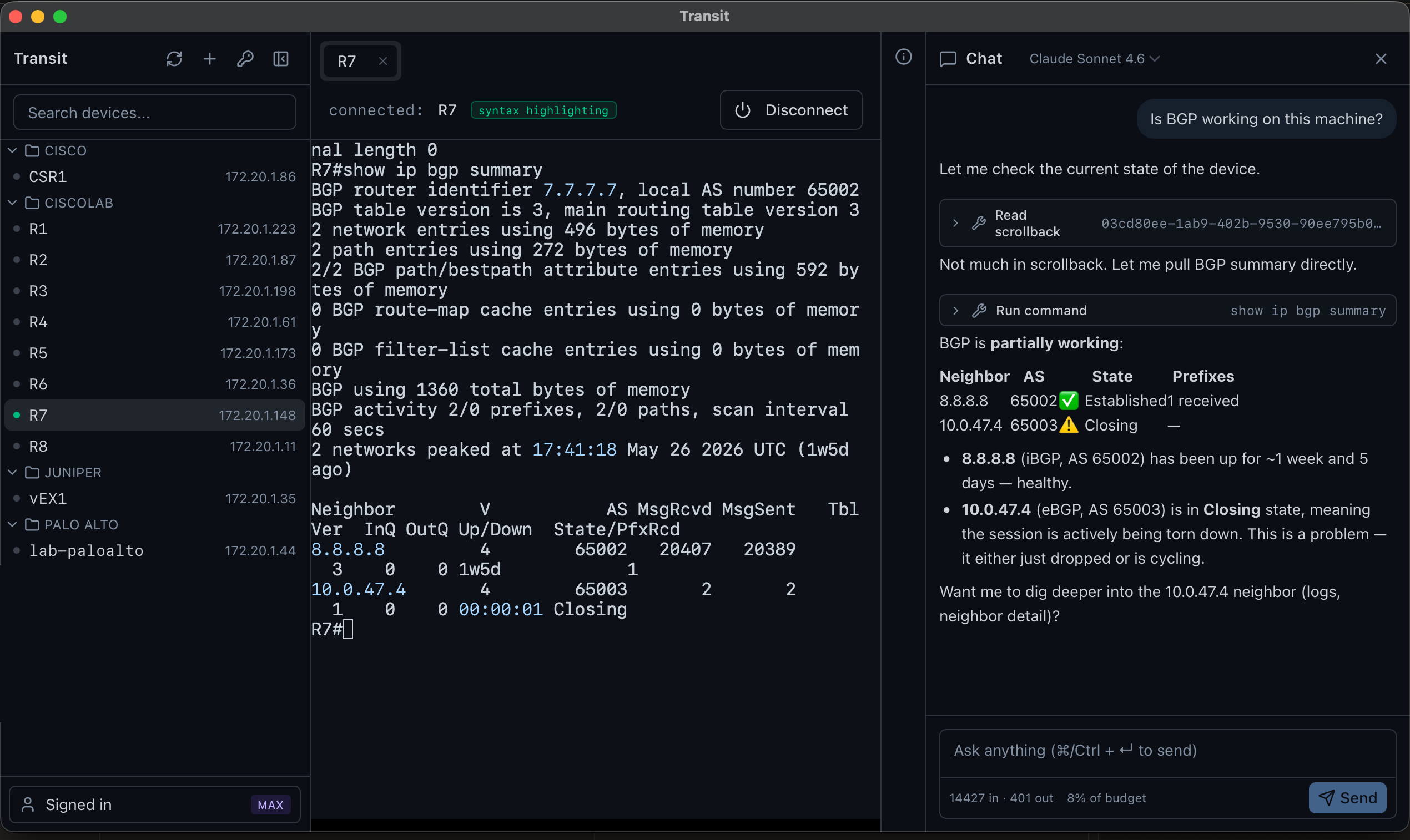
2. Ask questions.
That's IT.
Transit AI is a cross-platform SSH client with an investigation-only AI assistant for investigating switches, routers, and firewalls. Every command the AI proposes passes a per-vendor permit list and your explicit click. Always both, never either.
The IT is the point.
Free download · macOS · Windows · Linux · No account required
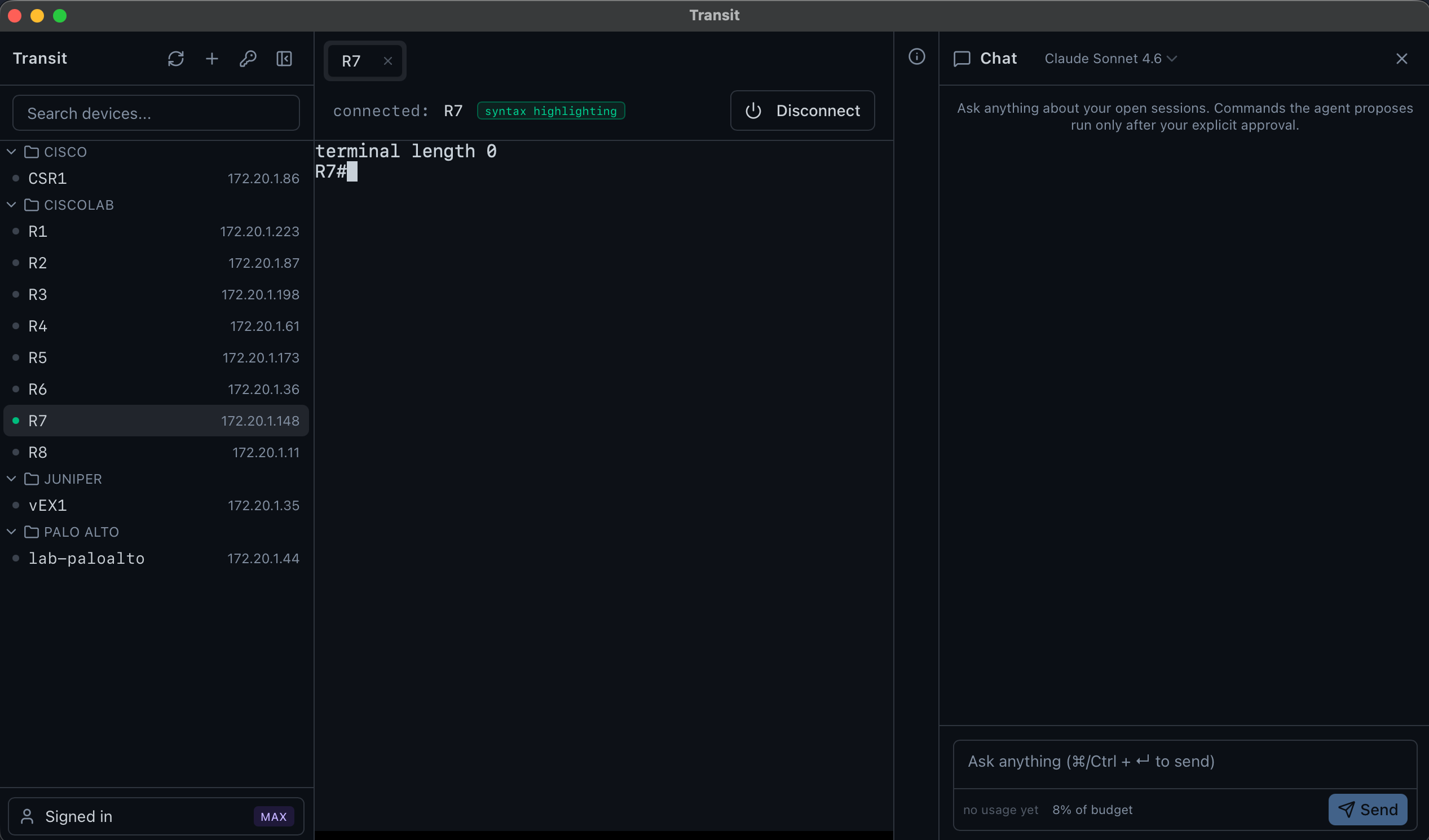
The terminal is free. Really.
Download Transit and use it as your everyday SSH and serial client at no cost — no account, no trial clock. Multi-session tabs, syntax highlighting, quick copy/paste, session export, and one-click import of your existing SecureCRT, OpenSSH, or CSV connection inventory. The investigation-only AI investigator is the paid upgrade, when you want it.
Security model
The three inviolable rules
Not preferences. Not promises. Built into the product — and verified on every release we ship.
Rule 1
Your SSH credentials stay in your OS keychain — Transit AI's UI never reads them back.
$ transit build --release
checking: AI component → credential store
no code path exists ✓
a build that adds one fails — checked on every release
Rule 2
The AI has four abilities — list, read, propose, ask. It can't gain a fifth at runtime.
agent tools (all of them)
✓ list open sessions
✓ read scrollback — secrets stripped first
✓ propose a command — gated, then approved by you
✓ ask you a question
✗ execute, configure, write — no such tools exist
Rule 3
Every AI-suggested command passes the vendor permit list AND your explicit click.
$ show ip bgp summary
permit list ✓ · your click ✓ → runs
$ configure terminal
permit list ✗ → blocked
Always both, never either.
Features
Built for network engineers
Your old SSH client just got upgraded — now with an AI that can investigate but can't change your gear.
Investigation-only AI agent
Ask, don't bash. The AI investigates with four tools — list, read, propose, ask — and every proposed command runs through a per-vendor permit list AND your explicit click. Always both, never either.
Per-vendor command policy
Default-deny regex lists for Junos, Cisco IOS / IOS-XE / NX-OS, Arista EOS, PAN-OS. Shell-escape verbs are explicitly blocked (no start shell, no tclsh, no app-hosting).
The AI never sees your credentials
Even a jailbroken model can't ask for your password — the AI and the credential store are isolated components with no programmatic path between them. An automated check fails the build if anyone tries to add one.
Multi-session tabs
The tab strip you already know. One terminal pane per session, scrollback survives tab switches. Right-click for rename, export scrollback, split right, close.
Secrets stay in your keyring
macOS Keychain, Windows Credential Manager, Linux Secret Service, or the SSH agent. Provider API keys (Anthropic, OpenAI) live in isolated proxy infrastructure — never on disk in the app.
Output redaction
PEM blocks, encrypted passwords, AWS keys, JWTs — stripped before scrollback ever reaches the LLM. Per-conversation ordinals (REDACTED:pem#1) let the agent reason about credential equivalence without seeing bytes.
Quick copy/paste, syntax highlighting
Per-device toggles. Auto-copy on selection, right- or middle-click paste, multi-line paste confirmation. Familiar, but way better.
Session export with re-redaction
Export any session's scrollback to a file. Re-runs the redaction filter on save and offers age encryption so a shared transcript can't accidentally leak.
Get started
Investigate faster. Change nothing.
Download the free terminal, or sign up to add the AI.